
VIP member

RFID高频读写器High frequency RFID reader with RF-1232-114A
RFID高频读写器High frequency RFID reader with RF-1232-114A
Product details
1. Overview:
Developed and produced by our company13.56MHz high-frequency RFIDreaderIt is a non-contact reader that automatically reads passive tags through radio frequency signals(15693 electronic tags or 14443 electronic tags (S70), and obtain tag information and other related data, can work in various harsh industrial environments. RFID readers can read fast-moving RFID tags, with fast and convenient operation, simple use, stable and reliable performance. They are mainly used for reading and writing electronic tags of production line materials, intelligent parking lots, AGV unmanned handling station point tags, and management system electronic tags.
2. Product features:
1. Supports ISO/IEC 15693 and ISO/IEC 14443A protocol standard electronic tag reading, compatible with ISO 18000-3.
2. Multiple communication interfaces, supporting RS232 serial communication interface, optional support for RS-485, Ethernet interface.
3. The default baud rate for the communication interface is 9600.
4. It can perform read, write, lock and other operations on multiple data blocks of electronic tags.
5. PBT engineering plastic, with an industrial protection level of IP55, has a sturdy structure and is easy to use, meeting the application requirements of harsh industrial environments.
6. Can recognize tags and read/write them, with no missed readings.
7. Fast reading time, with a reading rate of less than 20ms per time.
3. Application Fields
Mainly used inProduction line material management, intelligent parking lot,AGV unmanned transport vehicleForklift positioningRead and write electronic tags in the management system.
4. Technical indicators:
operating frequency |
13.56MHz |
working power supply |
10-30 VDC |
communication protocol |
ISO/IEC 15693 is compatible with ISO18000-3 |
Supported Protocols |
ISO18000- 3 |
Maximum read-write distance |
75-90mm |
Reading speed |
20ms/8 bytes |
Signal indication |
Red and green LED |
communication interface |
RS232 standard, optional RS-485, Ethernet interface |
Operating Temperature |
-20℃~+70℃ |
Storage temperature |
-30℃~+85℃ |
relative humidity |
10-80% |
size |
See attached page |
color |
Yellow and black, with black as the sensing surface |
Protection level |
IP65 |
material |
PBT engineering plastics |
5: Product photos and dimensions
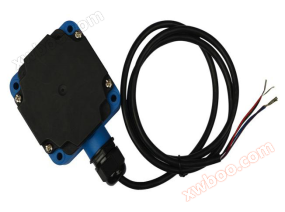
Installation positioning dimensions:4-φ5.5mm*27.5m

6. Wiring diagram of RFID reader/writer
line number |
color |
pin function |
1 |
red |
Vin 9-30vdc |
2 |
black |
GND |
3 |
blue |
TXD (RS232) |
4 |
purple |
RXD (RS232) |

7.RFID读写器与上位机通信数据包格式
This data message format is used forThe communication between the RFID reader and the upper computer is initiated by the upper computer sending commands (downstream), and the RFID reader responds (upstream). communication portBaud rate9600, 8-bit data, no odd parity, stop bit 1.
Command format:
frame header |
length word |
Data1 |
Data2 |
… |
DataN |
checksum |
end of frame |
01 |
1 byte |
1 byte |
1 byte |
… |
1 byte |
(CAL) |
FD |
Frame header:1 byte, 01.
Length words:1 byte, used to indicate the number of bytes in the data field, from Data1 to DataN (=N).
Data domain:Data1~DataN。
checksum(CAL): 1 byte, adding byte by byte from the first byte to the last byte of the data field, and then taking the lower 8 bits.
Note: The data in the table isA hexadecimal number. Instructions and Format:
1Activate card reading
The upper computer sends a command:
01 |
02 |
42 |
47 |
8B |
FD |
Card reading success returned:
01 |
02 |
42 |
47 |
8B |
FD |
Card reading failed without returning data
Example:
send out:010242478BFD
return010242478BFD automatically outputs the ID number of the electronic tag: 6D1757A3000104E0
2Stop reading the card
The upper computer sends a command:
01 |
02 |
45 |
44 |
8B |
FD |
If successful, return and stop card reading:
01 |
02 |
45 |
44 |
8B |
FD |
If it fails, no data will be returned
3readData for label 15693
frame header |
length word |
Data 1 |
Data 2 |
Data 3 |
checksum |
end of frame |
01 |
03 |
54 |
52 |
block number |
CAL |
FD |
The block number can be00,01,02,03…10,11,12…1,1B,1C)
If successful, return:
01 |
04 |
XX |
XX |
XX |
XX |
CAL |
FD |
Among them, the3-6 bytes are the read data (4 bytes).
If it fails, no data will be returned.
Example:
send out:0103545200A9FD
return01041000000014FD, Among them, there are 4 bytes of data stored in block 0.
4writeData for label 15693
frame header |
length word |
Data 1 |
Data 2 |
Data 3 |
Data 4 |
Data 5 |
Data 6 |
Data 7 |
checksum |
end of frame |
01 |
07 |
54 |
57 |
block number |
XX |
XX |
XX |
XX |
CAL |
FD |
Among them, the6-9 bytes are the written data (4 bytes).
If successful, return:
01 |
04 |
53 |
55 |
43 |
43 |
32 |
FD |
If it fails, no data will be returned or other data will be returned. If other data is returned, it may indicate that the written data is not what you need.
5readMifare tag data (S70 card)
frame header |
length word |
Data 1 |
Data 2 |
Data 3 |
checksum |
end of frame |
01 |
03 |
4D |
52 |
block number |
CAL |
FD |
response(Successful)
01 |
10 |
XX |
XX |
XX |
XX |
XX |
XX |
XX |
XX |
XX |
XX |
XX |
XX |
XX |
XX |
XX |
XX |
CAL |
FD |
Among them, the3-18 bytes are the read data (16 bytes).
6writeMifare tag data (S70 card)
01 |
13 |
4D |
57 |
Block number (0-3F) |
XX |
XX |
XX |
XX |
XX |
XX |
XX |
XX |
XX |
XX |
XX |
XX |
XX |
XX |
XX |
XX |
CAL |
FD |
Among them, the 6th-21 bytes are the written data (16 bytes).
Response (successful)
01 |
04 |
53 |
55 |
43 |
43 |
32 |
FD |
Instructions:
1The reader automatically reads the card when turned on.
2After receiving the stop card reading command, the reader/writer stops automatic card reading; Until receiving the command to start card reading and then resuming automatic card reading.
3The automatic card reading reads the labelID number.
When using commands to read and write cards, the reader stops automatically reading the cardReceived the command to start card reading or restarted to restore automatic card reading.
4read and writeWhen using Mifare tags, blocks with block numbers 3+4n (n=0,1,2...) cannot be read or written, meaning blocks with block numbers 3, 7, 11... cannot be read or written.
5After the command is issued, the module does not respond. First, check if the command word format is correct, especially if the checksum data is correct.
6When debugging serial ports, it is strongly recommended not to plug and unplug the serial port with power on. At least one end should be powered off during plugging and unplugging, otherwise the serial port is prone to damage.
Online inquiry
-
Contacts
-
Company
-
Telephone
-
Email
-
WeChat
-
Verification Code
-
Message Content
-