
VIP member
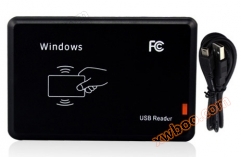
ISO14443A card reader
IC-USB Interface Card Reader ST-HF-01 Product Model: ST-HF-01ST-HF-01 Card Reader is a non-contact smart card read-only card reader developed based on
Product details
IC-USB interface card reader ST-HF-01
Product Model:ST-HF-01
ST-HF-01 card reader is a non-contact smart card read-only card reader developed based on the ISO14443A international standard protocol. It is a universal card reader designed with 13.56M non-contact RF technology. During use, it can be plugged and unplugged freely (plug and play) without the need for external power supply. Users do not need to load any driver programs, and the reading is stable, accurate, and reliable.
1.1 Usage/Installation Method
① Connect one end of the data cable to the corresponding interface of the computer and the other end to the communication port of the card reader. The card reader enters self-test and initialization from the "beep" sound;
② When the indicator light of the card reader is "red", it indicates that the card reader has entered the waiting card swiping state.
note:Test the method of reading labels with a card reader: Open the computer's output software (such as Notepad, WORDEXCEL, and other editors), place the card close to the card reader, and the label card number will be displayed at the cursor of the output software.
1.2 Method for detecting the connection of a card reader to a computer
The card reader enters the swipe mode, opens the "Device Manager" on the computer, and checks if the ergonomic input device appears in the options menu. If it does, it indicates that the device has successfully connected to the computer.
1.3 Precautions and Simple Troubleshooting
If the data connection cable is directly inserted into the charging plug, it will cause unsuccessful card reading.
There are many factors that affect the card reading distance, such as different protocols, antenna designs, surrounding environments (mainly metal objects), and different cards, all of which can affect the actual card reading distance.
If the reading distance of the card reader is too long, it will cause unstable or failed card reading. Avoid reading the card at the critical state (just enough distance to read the card). Two card readers that are too close at the same time can also interfere with each other.
To read the card, it is recommended to approach it naturally with the card facing the reader. The method of quickly swiping the card from the side is not advisable and does not guarantee successful card swiping.
When swiping the card, it is recommended not to operate the mouse to avoid transmitting data errors.
The length of the communication cable between the card reader and the computer should be less than 15 meters.
ØCard swiping does not respondIs the interface properly plugged in; Is the RF card compatible with RFID cards; Is the RF card broken; Is there another RF card within the card reading range.
ØforwardData errorDid you operate the mouse when swiping the card; Is the card being read in an environment with strong electromagnetic field interference; Is the communication cable between the card reader and the computer too long; Is it in a critical state for card reading.
2 application areas
Widely used in internet cafes, member management, KTV movie and TV VOD song ordering systems, fast food restaurant ordering systems, security control of storage boxes in offices/shopping malls/bath centers, various anti-counterfeiting systems and production process control, data collection and other fields.
Online inquiry
-
Contacts
-
Company
-
Telephone
-
Email
-
WeChat
-
Verification Code
-
Message Content
-